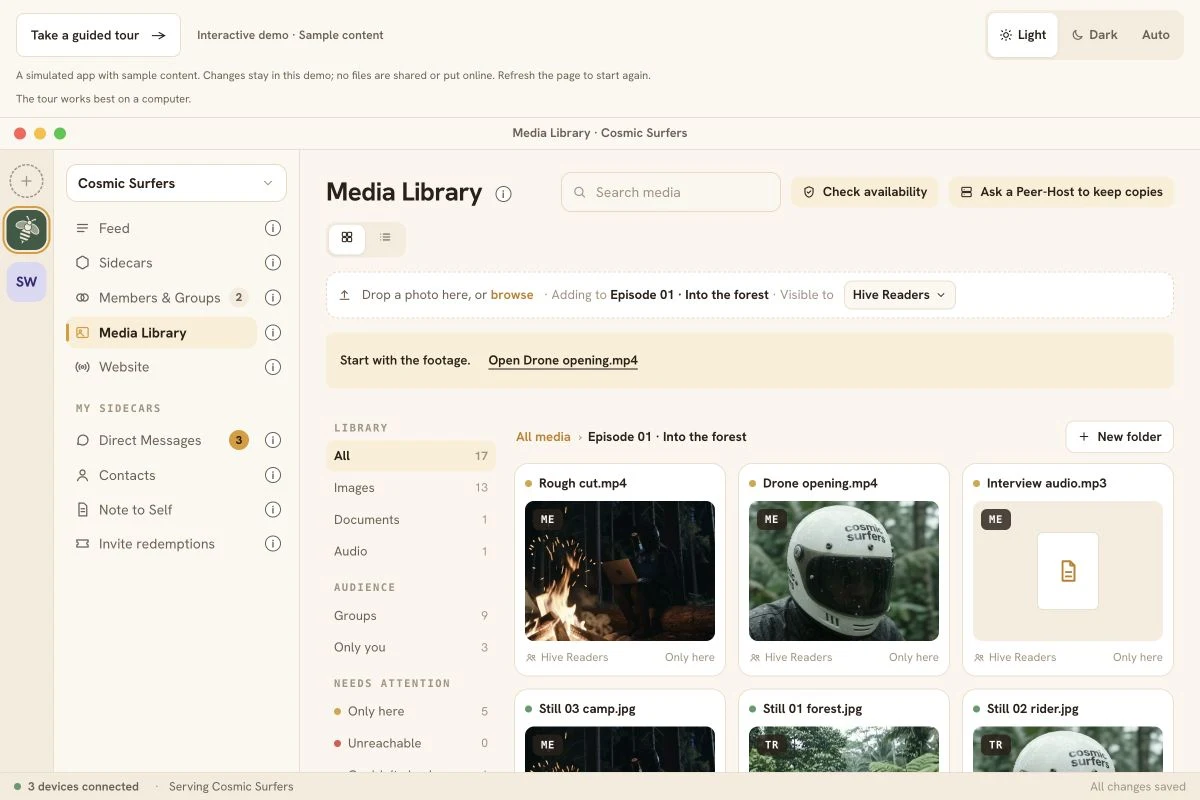
Your video, audio, photos and writing start on your own device, and the originals stay there. You pick who each file is shared with. You can put your story on your own website, served from your own device while it's on. Readers don't need an account.
HummHive is a protocol and an application to keep your media on your own devices and share it with the people you choose.
The application is what you see and click. The protocol is the rules underneath, so your device can share with other people's devices, peer to peer.
A Hive brings your material, people and tools together. For example: an episode's video and audio, the people you invite, and the tools you add. You choose who joins it.
See a Hive take shape.
One episode’s material, the people behind it, and the story they share. Choose a step to explore how the pieces fit together.
Start a Hive, add the episode’s video, audio and photos, invite your people, then post the story to their feeds.
Make it, write it, put it out yourself
From the crew’s Hive to a website they run.
Putting the episode on a website is a separate choice from sharing it inside the Hive.
Back at camp, the crew has reviewed the shared material. Selected photos and writing become “Into the forest”.
They set up a website and serve the story from one member’s computer while it is on. Readers can open it without joining the Hive.
The original footage, audio and photos remain on each creator’s own device.
Ask a Peer-Host, a device in your Hive with peer hosting turned on, to keep another copy of the episode's files. In Cosmic Surfers, that can be another member's computer.
On computers and phones: messages with media, sharing into a Hive, another copy on a Peer-Host, your website from your own device, and linking your devices.
Try the app demo.
This is Cosmic Surfers, the sample Hive from the top of the page, with the episode “Into the forest”, so you can explore how the app works using sample content.
Watch it work.
A recording from the Equinox briefing of 24 September 2026: the team makes a story and puts it on a website from their own device.
Sign and post a story from your device. Other devices exchange it so members’ feeds can catch up.
You postA signed story
Other devicesHold copies of the story
Other feedsCatch up as it arrives
Scroll sideways to explore the full diagram.
Animated diagram: A story reaches other devices.
Website stories and restricted media travel differently.
The photo story and the source clip can have different audiences.
How this works
A story is public on the web only when it's on your own website. Restricted media is locked to the people you chose. Change who can see a file later, and anyone who already had access keeps it.
Website storiesNot encrypted
Restricted mediaEncrypted for its audience
Audience changesAnyone who had access keeps it
Scroll sideways to explore the full diagram.
Animated diagram: Website stories and restricted media travel differently.
A copy beyond your device.
Ask a Peer-Host to keep another copy of an episode file.
How this works
You can check where the file is held.
Your fileStarts on your device
Peer-Host requestSent to a Peer-Host in your Hive
Another copyCheck where it is held
Scroll sideways to explore the full diagram.
Animated diagram: A copy beyond your device.
Find a connection.
Find the devices that can exchange your episode’s material.
How this works
Find other devices. Servers help your device find other devices and connect from behind a home router.
Your deviceLooks for other devices
ConnectionServers help past a home router
Direct pathUsed when available
Scroll sideways to explore the full diagram.
Animated diagram: Find a connection.
See your connections change.
See the devices connected while you share.
How this works
See which devices you're connected to and watch transfer activity change.
Connected devicesShown as they connect
Transfer activityChanges with connections
Scroll sideways to explore the full diagram.
Animated diagram: See your connections change.
Set the pace on your device.
Choose the upload pace for your source files.
How this works
Set how fast you upload and how many transfers run at once.
Upload speedSet a maximum
Parallel transfersSet how many at once
This deviceYour own limits
Scroll sideways to explore the full diagram.
Animated diagram: Set the pace on your device.
Small apps, like plugins.
Sidecars add tools to HummHive.
Built
Note to Self, a private place for your own notes.
Planned
Playlists with group chat, and peer backup.
Planned for builders
Sidecars that go open source with docs, so you can build your own. The app does the hard part: keeping the data and moving it between devices.